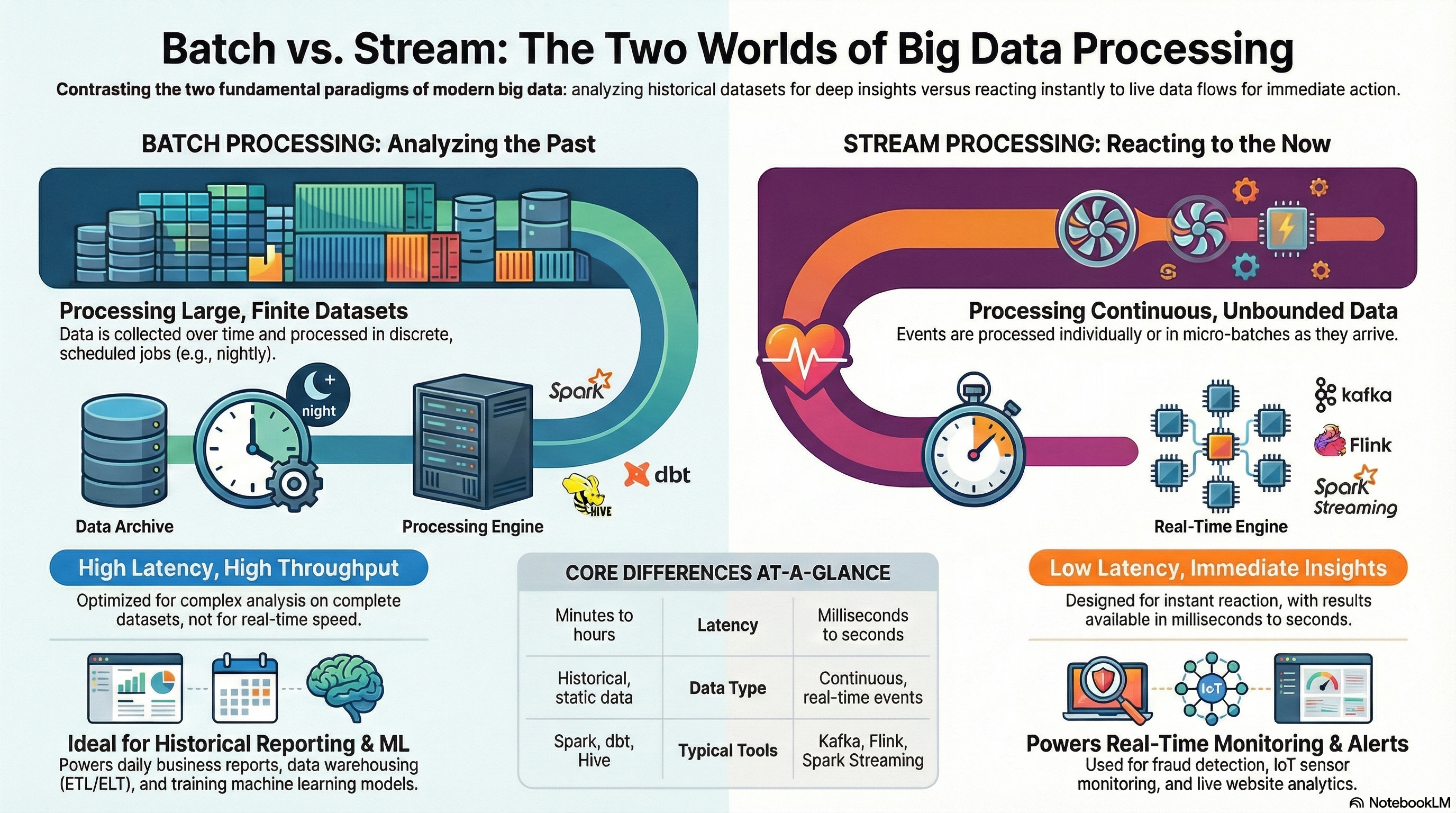
Modern data systems must handle both historical data analysis and real-time event processing. These two paradigms — batch and stream processing — differ in architecture, latency, and typical use cases, but often coexist within the same platform.
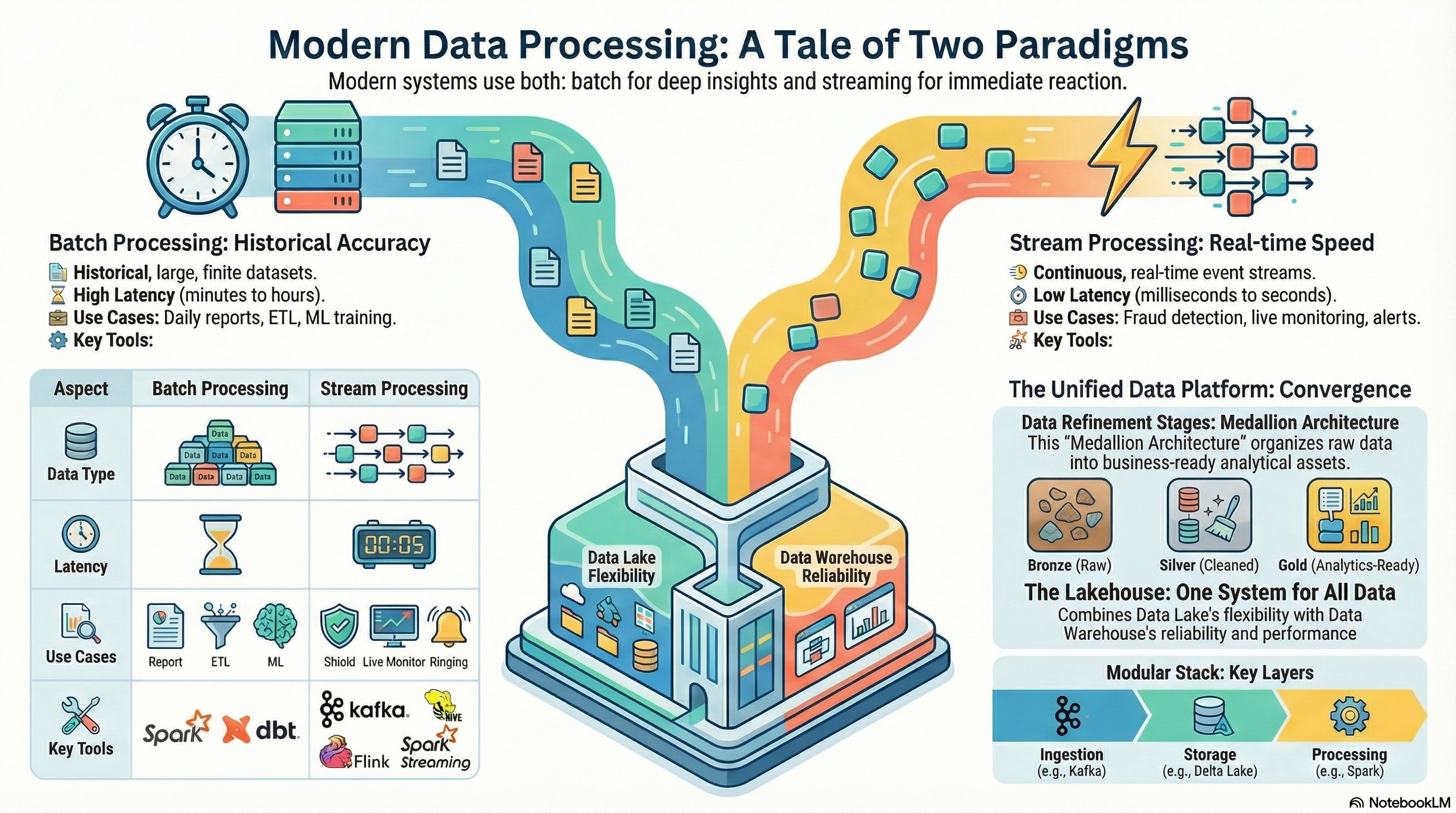
🧱 Batch Processing
Definition:
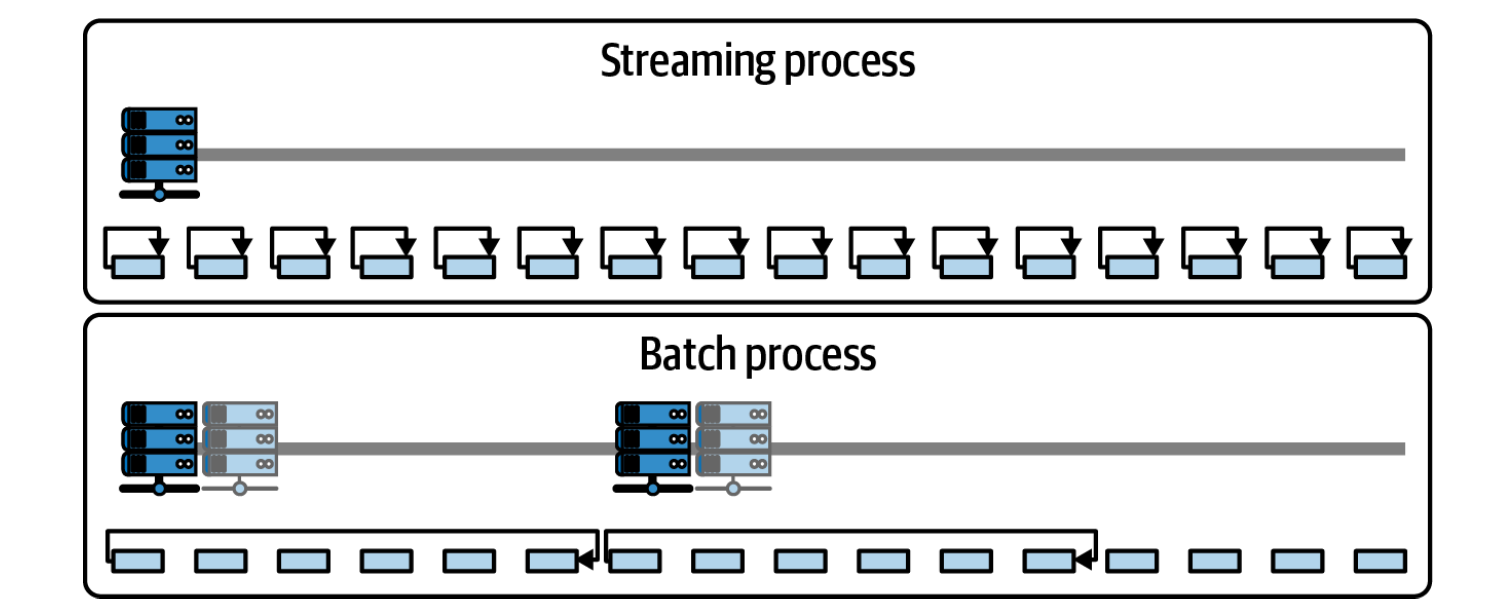
Batch processing involves collecting large volumes of data over a period of time and processing it in discrete, scheduled runs (e.g., hourly, nightly).
Characteristics:
-
High throughput, but higher latency.
-
Suitable for historical or aggregated analysis.
-
Data is complete and stable at the time of processing.
-
Usually triggered by orchestration tools (e.g., Apache Airflow, Dagster).
Typical Use Cases:
-
Daily business reports and dashboards.
-
Monthly billing and invoicing.
-
Data warehouse transformations (dbt, Spark SQL).
-
Machine learning feature generation from historical data.
Advantages:
-
Simpler fault tolerance and consistency.
-
Optimized for complex, large-scale aggregations.
-
Easier to maintain and debug.
💡 Example:
A nightly Spark job processes 2 TB of clickstream logs stored in S3 and aggregates them into daily marketing performance metrics.
🌊 Stream Processing
Definition:
Stream processing handles continuous data flows — events are processed as soon as they arrive, enabling real-time analytics and immediate responses.
Characteristics:
-
Low latency (milliseconds to seconds).
-
Data is processed record by record or in micro-batches.
-
Requires stateful processing and checkpointing.
-
Uses message brokers like Kafka or Kinesis.
Typical Use Cases:
-
Fraud detection in financial transactions.
-
Monitoring IoT sensors or website activity in real time.
-
Real-time personalization and recommendations.
-
Log analytics and alerting systems.
Advantages:
-
Real-time decision-making and alerts.
-
Reduced time-to-insight (no waiting for batch windows).
-
Scalable event-driven architectures.
💡 Example:
Kafka streams incoming payment events; Flink detects anomalies and flags suspicious transactions in under one second.
⚖️ Comparison of Batch and Stream Processing
| Aspect | Batch Processing | Stream Processing |
|---|---|---|
| Data type | Historical, static data | Continuous, real-time events |
| Latency | Minutes to hours | Milliseconds to seconds |
| Processing model | Periodic jobs | Continuous event flow |
| Complexity | Easier to implement | Harder — requires state management |
| Fault tolerance | Retries on failure | Checkpoints and event replay |
| Typical tools | Spark, dbt, Hive, Airflow | Kafka, Flink, Spark Streaming |
| Use cases | Reporting, ETL, ML training | Monitoring, alerts, fraud detection |
Modern architectures often combine both: batch for history and stream for freshness — the foundation of Lambda and Kappa architectures.
🚀 Key Technologies
Let’s break down the main frameworks powering batch and stream workloads.
🧩 Apache Spark
A unified analytics engine for large-scale data processing — supports both batch and streaming workloads.
flowchart TB
    subgraph Spark
        direction TB
        Core["Spark Core"]
        SQL["Spark SQL"]
        Streaming["Structured Streaming"]
        MLlib["MLlib"]
        GraphX["GraphX"]
    end

    Core --> SQL
    Core --> Streaming
    Core --> MLlib
    Core --> GraphX

    style Spark fill:#f9f9f9,stroke:#cccccc,stroke-width:1px,rx:6px,ry:6px
    style Core fill:#ffffff,stroke:#666666,stroke-width:1.2px,rx:6px,ry:6px
    style SQL fill:#ffffff,stroke:#888888,rx:6px,ry:6px
    style Streaming fill:#ffffff,stroke:#888888,rx:6px,ry:6px
    style MLlib fill:#ffffff,stroke:#888888,rx:6px,ry:6px
    style GraphX fill:#ffffff,stroke:#888888,rx:6px,ry:6px
    linkStyle default stroke:#999,stroke-width:1.2px,fill:none
Core features:
-
In-memory distributed computing for massive datasets.
-
APIs in Python (PySpark), Scala, Java, and SQL.
-
Modules:
-
Spark SQL – declarative data transformations.
-
Spark Structured Streaming – stream processing using micro-batches.
-
MLlib – distributed machine learning.
-
GraphX – graph analytics.
-
💡 Example:
# PySpark Structured Streaming example
stream_df = (spark.readStream
                  .format("kafka")
                  .option("subscribe", "events")
                  .load())

parsed = stream_df.selectExpr("CAST(value AS STRING)")
parsed.writeStream.format("delta").outputMode("append").start("/delta/events")
💡 Spark Structured Streaming uses the same API as batch Spark — allowing seamless transition between historical and real-time processing.
🔁 Apache Kafka
A distributed event streaming platform that acts as the backbone of many real-time systems.
Core concepts:
- Producer → Topic → Consumer model.
flowchart LR
    Producer["Producer"]
    Topic["Kafka Topic"]
    Consumer["Consumer"]

    Producer --> Topic --> Consumer

    style Producer fill:#ffffff,stroke:#666,stroke-width:1.2px,rx:6px,ry:6px
    style Topic fill:#f3f4f6,stroke:#333,stroke-width:1.5px,rx:6px,ry:6px
    style Consumer fill:#ffffff,stroke:#666,stroke-width:1.2px,rx:6px,ry:6px
    linkStyle default stroke:#888,stroke-width:1.2px,fill:none
- Partitions for parallelism and scalability.
flowchart LR
    subgraph Producers["Producer(s)"]
        P1["Producer 1"]
        P2["Producer 2"]
    end

    subgraph Topic["Kafka Topic"]
        direction TB
        Part1["Partition 0"]
        Part2["Partition 1"]
        Part3["Partition 2"]
    end

    subgraph Consumers["Consumer Group"]
        direction TB
        C1["Consumer 1"]
        C2["Consumer 2"]
        C3["Consumer 3"]
    end

    P1 --> Topic
    P2 --> Topic

    Part1 --> C1
    Part2 --> C2
    Part3 --> C3

    %% --- Styling ---
    style Producers fill:#ffffff,stroke:#666666,stroke-width:1.2px,rx:6px,ry:6px
    style Topic fill:#f9f9f9,stroke:#333,stroke-width:1.5px,rx:6px,ry:6px
    style Consumers fill:#ffffff,stroke:#666666,stroke-width:1.2px,rx:6px,ry:6px

    linkStyle default stroke:#999,stroke-width:1.2px,fill:none
- Offsets for message ordering and replay.
flowchart LR
    subgraph P["Producer(s)"]
        direction TB
        P1["Producer 1"]
        P2["Producer 2"]
    end

    subgraph T["Kafka Topic"]
        direction TB
        Part0["Partition 0: 0 → 1 → 2 → 3 → ..."]
        Part1["Partition 1: 0 → 1 → 2 → 3 → ..."]
        Part2["Partition 2: 0 → 1 → 2 → 3 → ..."]
    end

    subgraph C["Consumer Group"]
        direction TB
        C1["Consumer 1"]
        C2["Consumer 2"]
        C3["Consumer 3"]
    end

    P1 --> T
    P2 --> T

    Part0 --> C1
    Part1 --> C2
    Part2 --> C3

    style P fill:#ffffff,stroke:#666,stroke-width:1.2px,rx:6px,ry:6px
    style T fill:#f3f4f6,stroke:#333,stroke-width:1.5px,rx:6px,ry:6px
    style C fill:#ffffff,stroke:#666,stroke-width:1.2px,rx:6px,ry:6px
    linkStyle default stroke:#888,stroke-width:1.2px,fill:none
- Kafka Connect and Kafka Streams for integration and stream transformation.
Example Use Cases:
-
Log aggregation and centralized event bus.
-
Streaming ETL: ingest raw events → enrich → write to Delta Lake.
-
Backpressure handling for fluctuating workloads.
💡 Kafka is not for computation itself — it’s the data transport layer that feeds stream processors like Flink or Spark.
⚙️ Apache Flink
A true stream-first processing engine, built for real-time data processing that ensures low-latency, stateful event handling with exactly-once semantics, enabling reliable and consistent computations over continuously arriving data.
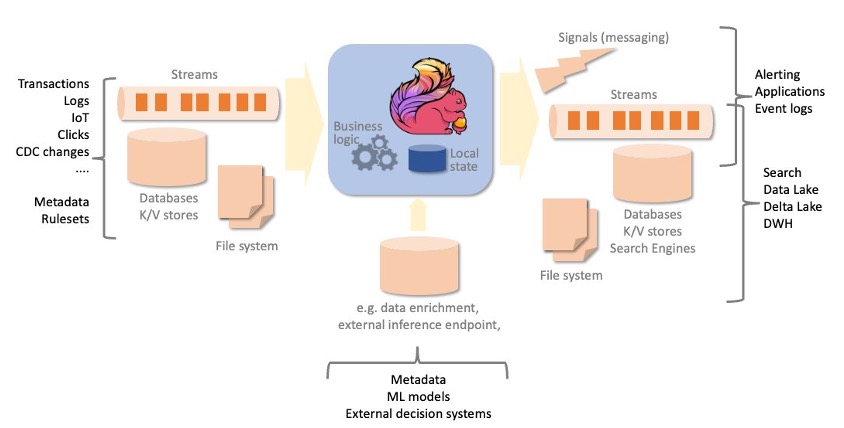
Core features:
-
Native streaming model (not micro-batch).
-
Exactly-once state consistency.
-
Time semantics (event time, processing time, watermarks).
-
Stateful operations (windows, joins, aggregations).
-
Integration with Kafka, S3, Cassandra, and Delta Lake.
Example Use Cases:
-
Fraud detection.
-
Real-time analytics dashboards.
-
Continuous ETL pipelines.
💡 Flink shines when latency <1s matters — it’s ideal for continuous pipelines that never stop.
💽 Delta Lake
Delta Lake is an open-source storage layer (by Databricks) that brings ACID transactions, schema evolution, and stream–batch unification to data lakes.
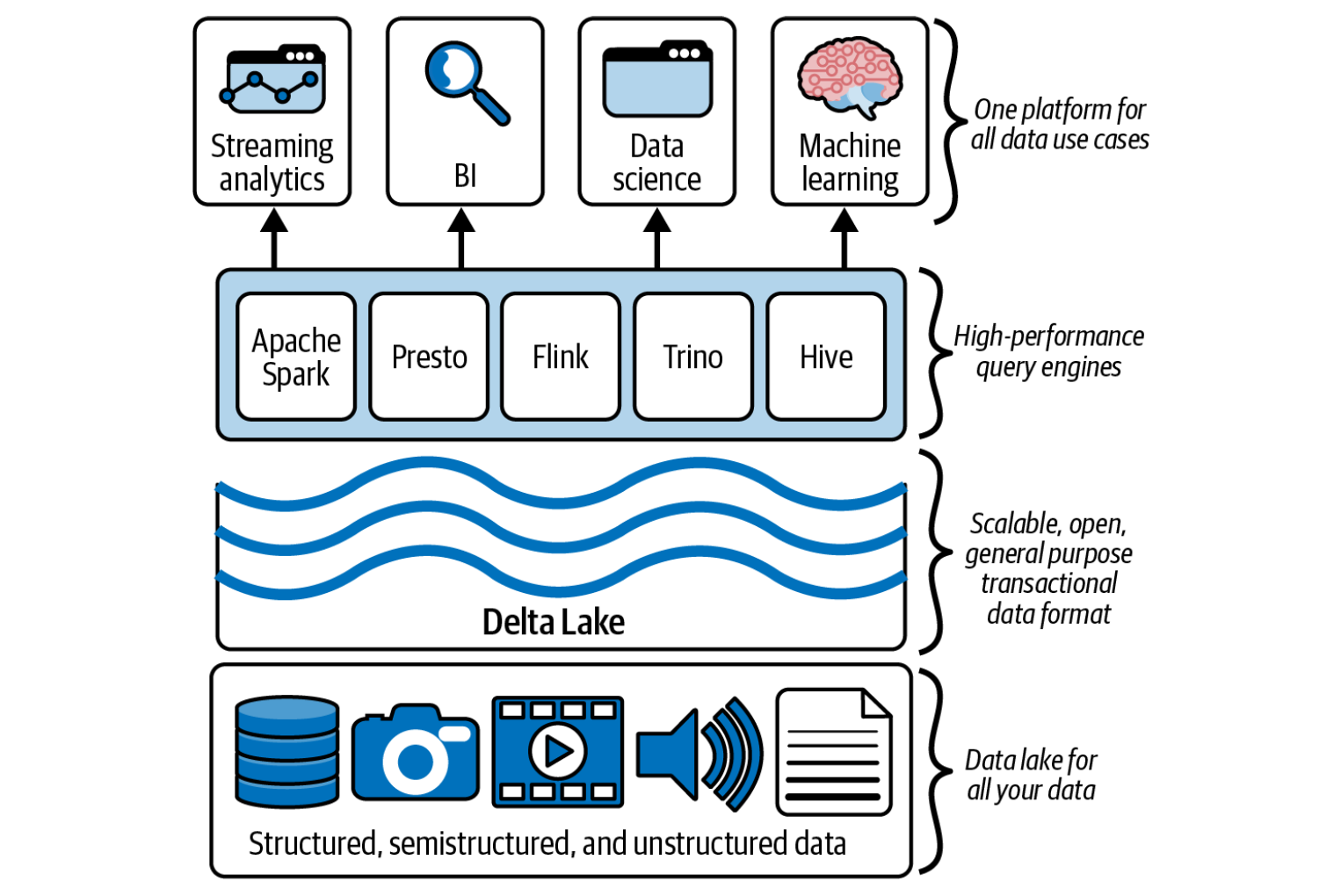
Key advantages:
-
Guarantees data consistency even under concurrent writes.
-
Supports time travel (querying historical data versions).
-
Optimized for both batch and streaming.
-
Compatible with Spark, Flink, and Kafka.
💡 Example:
Using Delta Lake, you can continuously write streaming data from Kafka and run SQL queries on it instantly:
from delta.tables import DeltaTable

# Stream from Kafka into a Delta table
stream = (spark.readStream
                .format("kafka")
                .option("subscribe", "events")
                .load())

(stream.writeStream
      .format("delta")
      .option("checkpointLocation", "/checkpoints/events")
      .start("/delta/events"))
💡 Delta’s unified batch/stream processing concept simplifies Lambda architectures — enabling a single table to support both historical and real-time data analysis.
🌐 Summary
| Technology | Type | Role in Pipeline | Typical Use |
|---|---|---|---|
| Apache Spark | Batch + Stream | Computation engine for large-scale transformations. | ETL, analytics, ML. |
| Apache Kafka | Stream | Message broker for real-time data movement. | Event transport, streaming ingestion. |
| Apache Flink | Stream | Low-latency, stateful processing. | Real-time analytics, monitoring. |
| Delta Lake | Storage Layer | ACID-compliant data lake supporting both batch and stream writes. | Unified Lakehouse foundation. |
🧠 Takeaway
-
Batch processing powers deep historical insight; streaming enables instant reaction.
-
Spark bridges the two worlds, Kafka moves data, Flink reacts in milliseconds, and Delta Lake ensures data reliability.
-
Together, they form the core engine room of modern data architectures — flexible, scalable, and real-time.