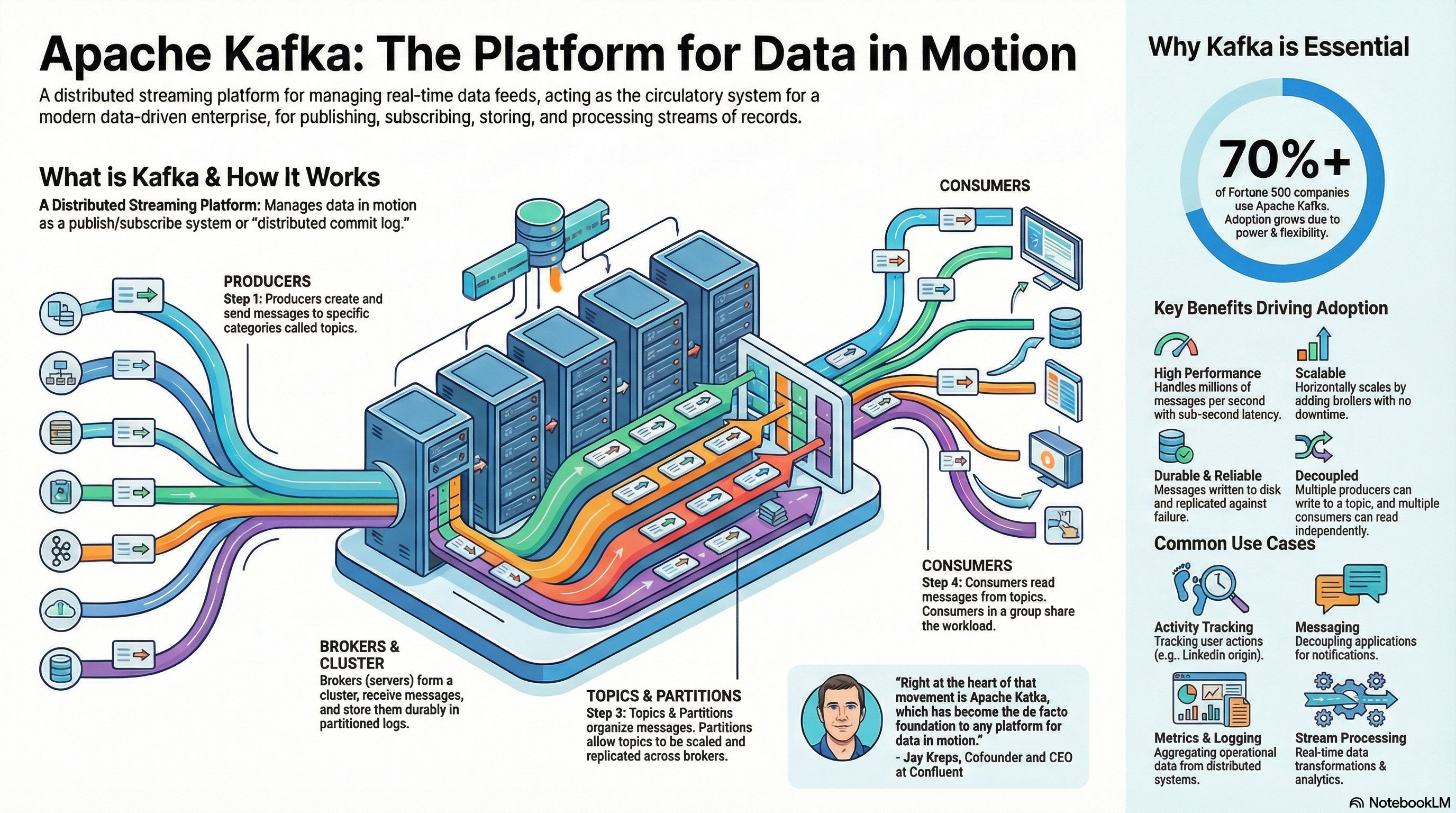
Introduction to Stream Data Transmission
Apache Kafka is a distributed streaming platform designed for real-time data ingestion, storage, and processing. It acts as a high-throughput message broker, enabling systems to exchange data in the form of continuous streams rather than periodic batches.
Kafka’s architecture is based on a publish–subscribe model:
-
Producers send messages (events) to topics.
-
Brokers store these messages durably.
-
Consumers subscribe to topics and read messages in real-time.
flowchart LR
    classDef producer fill:#ffcc00,stroke:#b8860b,stroke-width:2px,color:#000;
    classDef topic fill:#87cefa,stroke:#4682b4,stroke-width:2px,color:#000;
    classDef consumer fill:#90ee90,stroke:#2e8b57,stroke-width:2px,color:#000;
    classDef group fill:#f0fff0,stroke:#2e8b57,stroke-dasharray:3 3;

    A[Producer]
    subgraph Topic
        Partition0
        Partition1
        Partition2
    end

    subgraph G[Consumer Group]
        C1[Consumer A]
        C2[Consumer B]
        C3[Consumer C]
    end

    A --> Partition0
    A --> Partition1
    A --> Partition2

    Partition0 --> C1
    Partition1 --> C2
    Partition2 --> C3

    class A producer
    class Partition0,Partition1,Partition2 topic
    class C1,C2,C3 consumer
    class G group
Each topic is divided into partitions, which allows horizontal scaling and parallel processing.
Messages within a partition are ordered and assigned an offset — a unique sequential ID that enables consumers to track their reading position.
flowchart TD
    subgraph T["🧱 Topic: orders"]
        direction TB

        subgraph P0["Partition 0"]
            M0["offset=0 | order_id=101"]
            M1["offset=1 | order_id=102"]
            M2["offset=2 | order_id=103"]
        end

        subgraph P1["Partition 1"]
            M3["offset=0 | order_id=201"]
            M4["offset=1 | order_id=202"]
            M5["offset=2 | order_id=203"]
        end

        subgraph P2["Partition 2"]
            M6["offset=0 | order_id=301"]
            M7["offset=1 | order_id=302"]
        end
    end

    style T fill:#f9fafb,stroke:#888,stroke-width:1px,rx:10px
    style P0 fill:#e0f7fa,stroke:#00acc1,rx:6px
    style P1 fill:#e8f5e9,stroke:#43a047,rx:6px
    style P2 fill:#fff3e0,stroke:#fb8c00,rx:6px
Example use cases:
-
Log aggregation from microservices.
-
Real-time clickstream analytics.
-
Streaming ETL (Extract–Transform–Load) pipelines.
-
Event-driven microservice communication.
Kafka Topic & Partition — Message Lifecycle
Message Creation
-
A Producer sends a message to a Kafka topic.
-
Each message consists of:
-
Key (optional) → used for partitioning and ordering
-
Value → the actual data payload
-
Headers (optional metadata)
-
Timestamp
-
Partition Assignment
-
Each topic is divided into partitions for scalability and parallelism.
-
Kafka’s partitioner decides which partition a message goes to:
-
If a key is provided → partition =
hash(key) % number_of_partitions -
If no key → round-robin distribution (default)
-
-
This ensures:
-
Same key → same partition → guaranteed message order for that key
-
No key → even distribution across partitions
-
Message Storage
-
Messages are appended sequentially to the partition log file on disk.
-
Each message gets a unique, immutable offset — its position in the log.
    Partition 0:
    offset=0 | user_id=1 | "Login"
    offset=1 | user_id=1 | "View page"
    offset=2 | user_id=1 | "Logout"
-
Kafka never modifies existing records — it’s an append-only structure.
-
Data is flushed to disk in batches for performance and durability.
Replication
-
Each partition has a leader and follower replicas across different brokers.
-
Producers write to the leader; followers replicate asynchronously.
-
If the leader fails → one of the followers is automatically promoted.
-
This guarantees fault tolerance and high availability.
Retention & Cleanup
-
Kafka keeps messages even after they are consumed.
-
Data retention is controlled by topic configuration:
-
retention.ms→ keep data for a fixed time (e.g. 7 days) -
retention.bytes→ keep up to a certain size -
cleanup.policy=delete→ delete old logs -
cleanup.policy=compact→ keep only the latest message per key
-
-
When retention is reached → old log segments are deleted or compacted.
Consumer Reading
-
Consumers subscribe to topics as part of a consumer group.
-
Kafka assigns partitions to consumers in that group (each partition → one consumer).
-
A consumer reads messages sequentially from its assigned partition.
-
After processing, it commits the offset (i.e., remembers how far it read).
Offset Management
-
Each consumer group tracks its own read position (offset) per partition.
-
Offsets are stored in an internal Kafka topic
__consumer_offsets. -
This allows:
-
Different consumer groups to read the same data independently.
-
Consumers to resume from where they left off after restart.
-
Message Lifecycle Summary
| Stage | Description |
|---|---|
| Produced | Producer sends the message to a topic |
| Partitioned | Kafka assigns the message to a specific partition |
| Stored | Message is appended to the partition log and replicated |
| Read | Consumer fetches it based on offset |
| Committed | Consumer acknowledges processing via offset commit |
| Expired / Compacted | Kafka deletes or compacts old messages per retention rules |
🧠 Key Takeaways
-
Kafka is a log, not a queue — data is immutable and read-only by offset.
-
Each partition provides ordering and parallelism.
-
Consumers control where they read from (offset).
-
Messages remain available for multiple consumer groups simultaneously.
-
Retention defines when old data disappears, not when it’s consumed.
Setup local Kafka cluster
The easiest way to set up a local Kafka cluster is by using Docker. You can use the repository provided by Conduktor — a developer platform that simplifies working with Apache Kafka by offering tools for managing clusters, inspecting topics, and testing producers and consumers:
https://github.com/conduktor/kafka-stack-docker-compose
First, clone the repository locally:
git clone https://github.com/conduktor/kafka-stack-docker-compose.gitThen run the following command:
docker compose -f conduktor-kafka-single.yml up -dThis will download all the required images and start a local Kafka cluster with the minimal set of components — just enough to test and experiment with.
Creating Data Producers and Consumers
🧩 Producer
A Kafka producer publishes data to a Kafka topic.
Messages are serialized (commonly to JSON or Avro) and optionally keyed for partitioning.
Installation of kafka client:
pip install kafka-pythonExample (Python):
import json
import hashlib

from kafka import KafkaProducer


def hash_key_sha256(key: str) -> bytes:
    return hashlib.sha256(key.encode('utf-8')).digest()


producer = KafkaProducer(
    bootstrap_servers=['localhost:9092'],
    value_serializer=lambda v: json.dumps(v).encode('utf-8')
)

for i in range(5):
    event = {"user_id": i, "action": "click"}
    key = str(i)
    hashed_key = hash_key_sha256(key)
    producer.send('user_activity', key=hashed_key, value=event)

producer.flush()
producer.close()
print("✅ Messages sent successfully!")
In this example:
-
Each message is sent to the topic
user_activity(will be created if it doesn’t exist yet). -
Data is serialized as JSON.
-
The hash of the message number is used as the message key in the topic.
-
flush()ensures all buffered messages are transmitted. -
close()closes the session.
🧩 Consumer
A Kafka consumer subscribes to one or more topics and continuously polls for new messages.
Consumers are organized into consumer groups, which provide load balancing — each message is delivered to exactly one consumer within the group.
Example (Python):
from kafka import KafkaConsumer
import json

consumer = KafkaConsumer(
    'user_activity',
    bootstrap_servers=['localhost:9092'],
    auto_offset_reset='earliest',
    group_id='analytics-group',
    value_deserializer=lambda x: json.loads(x.decode('utf-8'))
)

for message in consumer:
    event = message.value
    print(f"User {event['user_id']} performed {event['action']}")
This consumer:
-
Starts reading from the earliest available offset.
-
Automatically commits offsets to Kafka.
-
Continuously listens for new events.
Practical Exercise — Simple Data Processing
Goal: Build a mini streaming pipeline that filters and transforms real-time user events.
Scenario:
You receive a stream of user activity events (e.g., page clicks), but you only want to process events from “premium” users and transform them into a structured format.
Step 1 – Producer:
Sends random simulated user activity events.
import random, time, json
from kafka import KafkaProducer

producer = KafkaProducer(
    bootstrap_servers=['localhost:9092'],
    value_serializer=lambda v: json.dumps(v).encode('utf-8')
)

users = ['alice', 'bob', 'charlie', 'diana']
for _ in range(20):
    event = {
        "user": random.choice(users),
        "is_premium": random.choice([True, False]),
        "event_type": random.choice(["click", "scroll", "purchase"])
    }
    producer.send('raw_events', value=event)
    time.sleep(0.5)
Step 2 – Consumer with Processing Logic:
Consumes events, filters by premium users, and publishes results to a new topic.
from kafka import KafkaConsumer, KafkaProducer
import json

consumer = KafkaConsumer(
    'raw_events',
    bootstrap_servers=['localhost:9092'],
    value_deserializer=lambda x: json.loads(x.decode('utf-8')),
    auto_offset_reset='earliest'
)

producer = KafkaProducer(
    bootstrap_servers=['localhost:9092'],
    value_serializer=lambda v: json.dumps(v).encode('utf-8')
)

for message in consumer:
    event = message.value
    if event["is_premium"]:
        transformed = {
            "user": event["user"].upper(),
            "event": event["event_type"],
            "timestamp_processed": message.timestamp
        }
        producer.send('processed_events', value=transformed)
        print(f"✅ Processed: {transformed}")
Step 3 – Validation Consumer:
Read the processed stream and verify transformation.
consumer = KafkaConsumer(
    'processed_events',
    bootstrap_servers=['localhost:9092'],
    value_deserializer=lambda x: json.loads(x.decode('utf-8')),
    auto_offset_reset='earliest'
)

for message in consumer:
    print("📦", message.value)
🧠 Key Takeaways
-
Kafka provides a highly scalable, fault-tolerant platform for handling real-time streams.
-
Producers write messages to topics; consumers read and process them asynchronously.
-
Combining multiple consumers and topics allows you to create streaming pipelines that clean, filter, and enrich data in motion — often replacing or complementing traditional ETL.